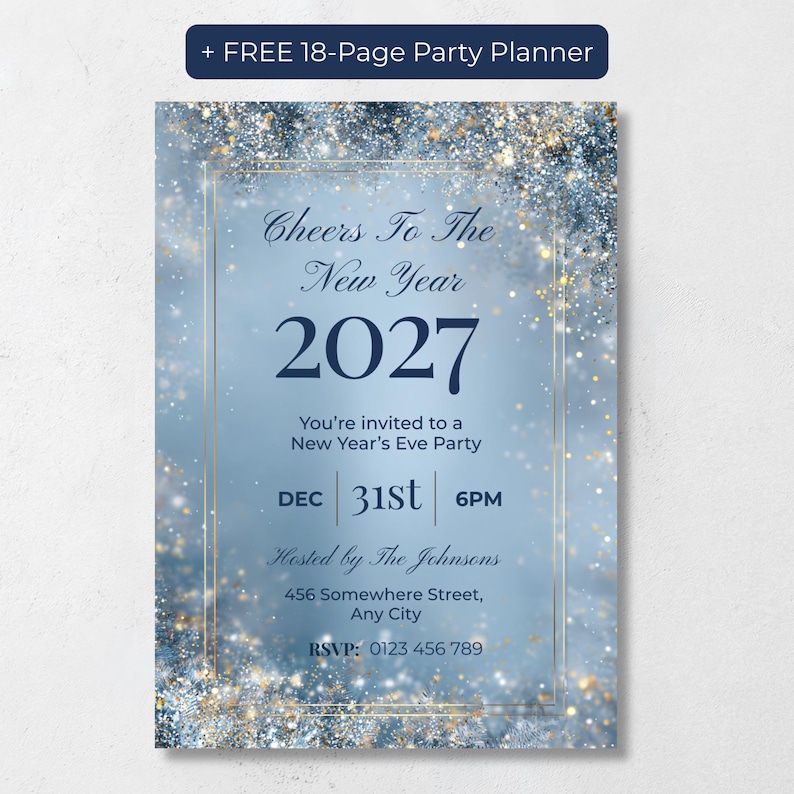
The best New Year's Eve text invitation is a vertical 1080x1920 image, sent as a PNG or JPG, with clear high-contrast text and a short RSVP message. PR Creative Digital's Cheers to the New Year Invitation is an editable Canva template made for this. It includes a phone version for texting, a matching 5x7 printable, and two free party planning bonuses.
Paper invitations are lovely, but for New Year's Eve most hosts just want something that looks great, lands on guests' phones today and gets fast RSVPs. A text invitation does all three, as long as you get a few details right. Here's how to make one that looks polished rather than like a screenshot of a flyer.
Why text invitations work so well for New Year's Eve
- Speed. NYE plans often come together in December, and a text reaches everyone in minutes.
- Faster RSVPs. Guests can reply right in the thread instead of hunting for a phone number on a card.
- No printing or postage. There's nothing to buy, address or mail.
- Easy to update. If the start time changes, one follow-up text fixes it.
What makes a good text invitation
Not every invitation translates well to a phone screen. Before you send, check these points:
- Use a vertical phone size. A 1080x1920 pixel image fills the screen in portrait, so guests don't have to zoom. A 5x7 card sent as an image still works, but it shows up smaller with empty space around it.
- Send an image, not a PDF. PNG or JPG files open instantly in messages. PDFs often need an extra tap or another app.
- Keep text big enough to read. If you have to pinch to read the address, make it larger.
- Choose high contrast. Dark text on a light background, or light text on a dark one, stays readable even with phone brightness turned down.
Step by step: create and send your NYE text invitation
- Choose an editable phone-size template. Look for one made at 1080x1920 rather than a print card resized to fit.
- Open it in Canva. A free Canva account is enough for most editable templates, and you can edit in your browser or the Canva app.
- Add your details. Fill in the headline, host, start time, address and an RSVP-by date. If you need wording ideas, read our guide to Cheers to the New Year invitation wording.
- Download it as a PNG or JPG. In Canva, choose Share, then Download, and pick PNG or JPG.
- Send it individually or to small groups. One big group chat can turn noisy fast and shares everyone's number with everyone else. Sending the image to each guest, or to small groups who already know each other, keeps it personal.
- Add a short message with the image. The image sets the mood, and the message makes the RSVP easy.
What to write with your text invitation
Pair the image with a line or two so guests know exactly what to do:
- "You're invited! We'd love you to ring in 2027 with us. Can you let me know by December 20?"
- "Cheers to the New Year! Here's the invite 🥂 Just reply yes or no so we know how much champagne to chill."
- "Saving you a spot for our New Year's Eve party! All the details are on the invite. RSVP by December 20."
When you should print a few too
Texting works for most guests, but it's worth printing a handful of invitations for grandparents, neighbors without smartphones, or anyone who'd appreciate a card on the fridge. Choosing a design that comes in both a phone size and a printable size means you only edit your details once and everything matches.
A text-ready New Year's Eve invitation
If you'd like a design that's already set up for texting, the Cheers to the New Year Invitation, Editable Silver Glitter New Years Eve Party Invite includes a 1080x1920 phone version made to fill the screen, plus a matching 5x7 printable. It has navy text on a silver sparkle and icy blue background, so it stays easy to read on a phone. You edit everything in Canva with a free account.
The bottom line
A great New Year's Eve text invitation is phone-sized, easy to read and sent with a clear RSVP line. Get those right and it can look every bit as elegant as a printed card, while getting replies much faster.
Frequently Asked Questions
What size should a text invitation be?
1080x1920 pixels is a standard vertical phone size that fills the screen. The Cheers to the New Year Invitation includes a phone version at exactly this size.
Can I edit the invitation on my phone?
Yes. Open the template link in the Canva app to edit on your phone or tablet, then download the finished image to send.
Can I use the same design for printed invitations?
Yes. The listing includes a 5x7 printable version of the same design, so your texted and printed invitations match.
Is the background editable?
The silver sparkle background is fixed. All the text can be edited.